
What is MultiTerm?

November 18th, 2008 by sarab

If you are a working with the , you may have seen a component called in your product package. So, just what is this tool and how practical is it for every-day ?

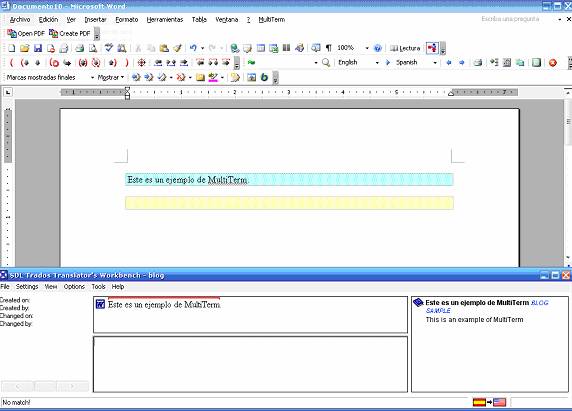
is ideal for working with bilingual glossaries or ongoing projects with highly specific terminology. Many times clients will send their glossaries in an Excel sheet with their own translations of product names or terminology for the sake of consistency between terms found in user manuals, online material, etc. In these cases, it is critical to use the glossary sent by the client. What the product does is convert the glossary into an .xdt file which is recognized by and can then be linked to the workbench. What this means for the is that instead of searching through countless entries of an Excel file looking for the right term, will automatically recognize if the term is in the glossary, and if so, it will display the corresponding translation in the “” window on the Workbench.

While there are several steps involved in the process, I have found that it is well worth the time and energy to learn how to use this product, as well as its other features. Not only is this ideal for , but it is also great for project managers who are using several different for a document with very specific terminology.

Share this post:

Share this post with the world.
  • Google
  • Reddit
  • StumbleUpon
  • Technorati
  • del.icio.us
  • Facebook
  • Digg
Tags: , , , , , , ,

Related posts

2 Responses to “What is MultiTerm?”

  1. Kevin Lossner Says:

    Unfortunately, the acceptance (utilization) rate of MultiTerm among Trados users is probably less than 10%. This is largely due, I believe, to numerous compatibility issues between different versions and the general poor level of mastery of the tools by users. Too many people forego the advantages this tool offers and rely instead on time-consuming concordance searches, which if performed with poorly maintained translation memories can have very unfortunate consequences.
    One of the hallmarks of a good terminology database in MultiTerm is the inclusion of important attribute information, such as an indication of which products a term applies to, the status of the term (for example: preferred, approved, under review, barred, etc.), subject domain, etc. MT termbases creates from a customer’s Excel list (as mentioned in this post) can be used to perform final QA in TagEditor to audit compliance with obligatory terminology.
    One important part of the MultiTerm suite for me is MultiTerm Extract, which I use for term mining in existing TMs or large jobs that I am starting. I have used this tool on many occasions to create rather nice dictionaries for customers after months or years of work and give them a little “extra” benefit for a long-standing relationship. If terminology work is carefully considered in the project quotation process, this tool can pay for itself in a short time. There are many other tools out there for similar work, butr the integration with MultiTerm makes the Extract module the right choice for Trados users.

  2. sarab Says:

    Thanks for the contribution Kevin. You are right about the compatibility issues and lack of mastery of the tools by users. I think that if more translators knew how much time would be saved with MultiTerm, more would take the time to learn how to use it, as well as MultiTerm Extract. Enjoy the blog!

Leave a Reply